Wednesday, 19 October 2022

Exercise: Writing an Academic Article

Use technology to manage a bibliography, referencing and in-text citations.
This exercise introduces MS Word style sheets and References...

The following illustrative exercise uses the ECIS template on Google Drive (link).

1. Copy the template from the shared folder to your own computer.
2. Rename your file using the following pattern "Surname_MyResearchProject_YYYY.doc".
For example my own paper is going to be "HigginsEtAl_WorkingInVirtualLight_YYYY.doc". I have used the author convention "SurnameEtAl" as there are three or more authors.
3. From the MS Ribbon "Home" open the Styles Panel. The "Current style" field show the current text style wherever the cursor is in your Word file. Alternately navigate to top menu "Format>Style" for similar.
The current style at cursor location

4. Select section 1 "First level heading" and rename it "Introduction"

5. Paste and match formatting using following unformatted text as new paragraphs for section 1
Critical management studies appreciate that products and services, produced with technologies, by organisations, and the involvement of users, rely upon "actors having formal and symbolic resources for the exercise of... systematic forms of control over organisational participants, and indirectly over other groups and non-human objects"\citep{AlvDee2000aa}. The techniques and skill of management for producing digital goods and services (through software, hardware and systems) at its best aims to resolve this through the delicate, democratic balancing of power, control of resources, shaping of work culture, and leadership \citep{Kid1981aa}. The following brief introduction to the literature positions this study within the broad field of management information systems and seeks to inform further creative, design, and development initiatives.This study looks at...


6. Confirm that the paragraph current style is "Basic text"

7. Select the following text and change its style to "Subtle Emphasis". You many need to filter the style list selection at the bottom of the styles window.
“actors having formal and symbolic resources for the exercise of... systematic forms of control over organisational participants, and indirectly over other groups and non-human objects”
8. With the MS Ribbon "References" active...
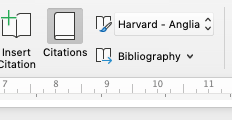
Select the LaTeX citation command \citep{AlvDee2000aa} and replace it with the MS Word equivalent citation, i.e. from the References Ribbon select "Insert Citation". You may need to create a new entry in the Word file's Citations collection
Create a new citation source record

Enter a new source record as follows (n.b. add ", p. 7" to be thorough)
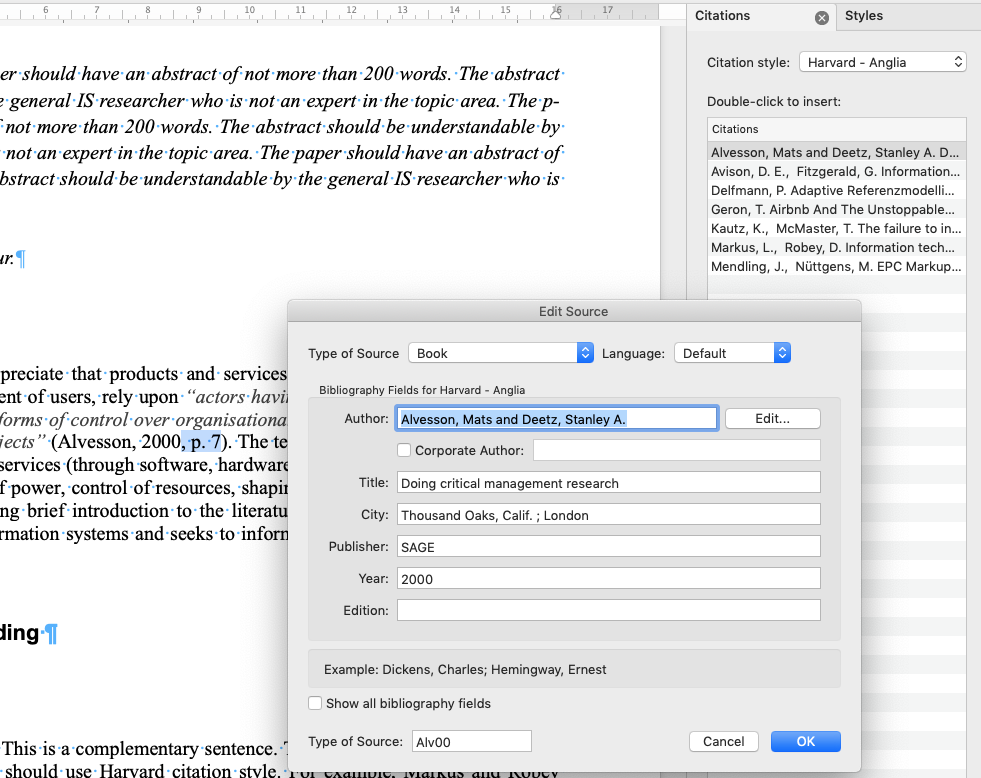
MS Word's new citation source editor

9. Similarly replace the LaTex/Bibtex command for Kidder "\citep{Kid1981aa}" with
Adding Tracy Kidder's Soul of a New Machine to the citation list in your MS Word document
10. Now regenerate the bibliography at the end of the draft paper by navigating to the "References" section, and selecting "Bibliography" to insert a new bibliography. You'll end up deleting the previous copy. You'll also need to reapply the style "Reference" to this text
n.b. the bibliography style-type (Harvard - Anglia) and the insert "Bibliography" command


For further background refer to the notes on the term paper at:
https://managingdesignanddevelopment.blogspot.com/2015/04/term-paper-and-presentation-guidelines.html

Writing styles: The term paper is written in an academic style, presenting your background reading, method, research, analysis, theorising and critiquing aspects, for example of the history, situation, processes etc of a particular sourcing context. Consider identifying an exemplary paper that you aspire to emulate or to compare your own paper with.
You must use the specified scientific conference template for the term-paper. Choose between either the LaTeX or Word template from the ECIS 2015 conference. Copies are available on (Google Drive link). By using and sticking with the ECIS template your paper will automatically conform with the scientific format guidelines for that conference.


Self-assessment for this exercise:

  1. Did you upload the file (e.g. word file)?
  2. Did you use the correct template?
  3. Did you add a new source record into the document?
  4. Did you insert a citation into the text of the document?
  5. Did you regenerate the bibliography/references at the end of the document? 

Cultural probe method exercise

"Some complex design challenges involve people of different cultures, languages, and societies where traditional research approaches won't help us adequately emphathize with their experiences." (Battarbee et al., 2012: p. 7)

The cultural probe method encourages participants to make a visual journal and reflection of their encounter with a culture context/experience. Probes gathered and compared across many participants offer the possibility to provide both generalisable information and deep insights (potential for broad and/or deep learning).

The following exercise provides a 'flavour' of the method:

Suggested protocol to conduct a cultural probe as follows:
  1. Take a trip to a local shop, market, or a specialist food store.
  2. Purchase 1 inexpensive food item you never tried before (1x photo).
  3. Research how to prepare it to eat or use it as an ingredient.
  4. Follow the recipe to prepare the food and test it.
  5. Write a paragraph-note summarising the exercise.
  6. Findings: Captured in (at least) a 1+ photo and (at least) a 1+ paragraph-note.
Reflections from students:
"The homework’s cultural probe was an assignment that made me reflect on the concept of design empathy and the importance of investing yourself into new contexts and open your senses. The bad designs homework has for example made me look at the world in a different ways. I now notice things from a design perspective that I otherwise wouldn’t have noticed before."

"The cultural probe exercise was not a simple cooking exercise, for a first-time chef like me; it was an interest-oriented, research-based, process designed operation with excellent results."

Thursday, 6 October 2022

Exercise: (b) Design a text-free search interface

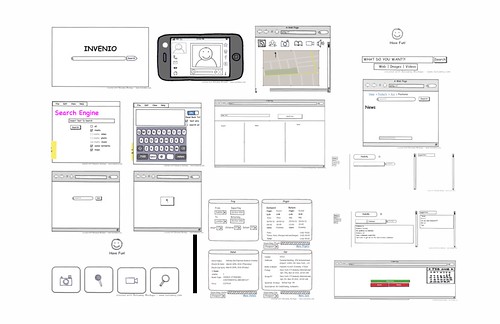
Some hand-drawn ideas and doodles...

The goal of this exercise is to familiarise students with interface design approaches and tools. First by using pencil/pen and paper. Second by using the Balsamiq wire-frame tool to mock-up your design.

Objective
To practice creating design artifacts to display and test technology use/interaction ideas.

Material
A4 paper, pencil or pen.
Create an account on Balsamiq Cloud (no payment details are needed).
Log In to Balsamiq Cloud
https://balsamiq.cloud/#login

Instructions
1. Use paper/pencil sketch a mockup of a new kind of Internet ‘search page’ that doesn’t use text (at all)! (allocate 10")
2. Collect the sketches and display them to the class; allow the group to provide a brief commentary. (allocate 10" to display all mockups).
3. Next, use Balsamiq to create a digital version of the design. The new design may vary from the paper/pencil sketch. (allocate 15")
4. Discuss the following reflection points. (allocate 10")

Reflection
How did the quality and level of design discussion differ from the earlier exercise?
Comment on how you conceptualised or simulated the 'user' of your design.

References
Snyder, C. (2003) Paper Prototyping: The fast and easy way to design and refine user interfaces, San Francisco, CA, Morgan Kaufmann, Elsevier Science.


(other tools include: wireframe.ccapp.moqups.cominvisionapp.comsketchapp.comAxureJustinmindMarvelapp/POPapp and iRise)


Previous Student Examples

Dilyan's example: Fast booking mock up: Fast booking mock up

Whole class examples in collage:
designdiagrams02

Monday, 3 October 2022

Lean Software Development: An Agile Toolkit

Poppendieck & Poppendieck (2003) borrow the notion of 'lean' from Taiishi Ohno's Toyota Production System approach and adapt the system to software development. The guiding principle behind the idea of 'lean' software development is to eliminate waste in the form of inventory stock and piece work dwell times from any and every aspect of work possible. In borrowing lean principles and terminology, which were developed for physical goods manufacturing, how does 'lean' apply to software's 'perfect' manufacturing environment (perfection in this sense meaning to software's potential for its manufacture of exact copies of an original via digital copying)?

Waste is present in the guise of unnecessary formality and management overhead.
Extensive documentary efforts lead to waste, excessive communication (meetings) lead to waste, excessive processes, interruption, delays and defects all lead to waste in the software process.
Using the 'lean' model requires that we apply tests to work activities to establish their validity.
"A good test of the value of paperwork is to see if there is someone waiting for what is being produced." (Poppendieck & Poppendieck, 2003:5) They note that the most wasteful work around documentation efforts surrounds attempts to produce documents that "contain all of the information that the next person in line needs to know." (p7) Explicit documentation requires infeasible completeness; rely instead on tacit knowledge and direct communication between producer and receiver. The cases given in this book emphasise processes of communication, on incremental delivery, communication with customers, taking care to produce and give what is really needed, delivering simplest possible meaningful feature sets as quickly as possible.

All software is partially done, or rather is always potentially subject to change. Because software is amenable to change and its requirements are difficult to establish unambiguously software development processes are designed to reduce risk. Managing large software developments is an inherently risky process (Royce, 1970). In industry two polar extremes are taken by attempts to address risk: to establish perfect clarity prior to commencing the work, or to get feedback by producing something as early as possible (to give producer and customer a concrete artefact to explore, clarify, negotiate and make sense of. Lean takes the second position as its goal. P&P paraphrase Royce (1970) by stating that "every step in the waterfall process except analysis and coding is waste." (Poppendieck & Poppendieck, 2003:4). However Royce's own position was that "there are two essential steps common to all computer program developments, regardless of size or complexity. There is first an analysis step, followed second by a coding step... This sort of very simple implementation concept is in fact all that is required if the effort is sufficiently small and if the final product is to be operated by those who built it" (Royce, 1970: 328).

Value stream mapping is one way of describing the 'as-is' situation and preparing to change current processes and the balance of effort invested in development. Lean thinking applies the view that early feedback reduces waiting, the goal for which is to free the developer somewhat and the customer too, to give each the opportunity to clarify meaning and learn from each other what is desired, desirable, degrees of freedom and constraints. The implication of providing and giving early feedback is to recast the idea of who controls and manages development, instead control or management figure through involvement in production. Development may at this extreme be better understood as co-production. How then is this heightened communication between customer and developer attained?

References
  • Poppendieck, M. & Poppendieck, T. (2003) Lean Software Development: An Agile Toolkit Upper Saddle River, NJ, USA, Addison Wesley.
  • Royce, W. W. (1970) Managing Development of Large Scale Software Systems. IEEE WESCON. TRW. http://facweb.cs.depaul.edu/jhuang/is553/Royce.pdf

Notes:

SA 1: Is the use of a manufacturing metaphor in what is clearly a field of design and development work strictly applicable?

SA Note 1: The two fields of design and manufacturing are both conceptually and physically different. Certainly software duplication does not require the sorts of controls and efficiencies sought for in scaling production of physical goods manufacture. For digital media the finished product is absolutely the end of the story. More importantly, in the case of software a shift of focus from reproducing a digital good towards the work of designing the good is absolutely necessary. Software development's focus must be upon everything that precedes the production of the first copy of the end product. The manufacturing metaphor has limits when applied to software development however the principles of 'lean' are still relevant and applicable to software's activities: design, analysis, coding etc.

Good UI delivers visibility, feedback, control.

Golden Krishna's thoughts on 'NO UI' prompted a response by his colleague at Cooper Design, Stefan Klocek, who argued back that good UI can be, should be, is desirable. Design should not be about removing UI, but that good UI is instead about those three big things that Don Norman focuses on: visibility, feedback, control. Klocek's article is available from The Cooper Journal (link)

The best interface is no interface

Who doesn’t want Twitter inside the refrigerator? 
I'm sorry, Twitter in my refrigerator, why?

“Upgrade your life” with a better refrigerator door from Samsung and check Tweets when getting some water from the fridge?? 

 How do you make a better hotel lobby? Slap an interface in it. A giant touchscreen with news and weather is exactly what’s missing from my hotel stay?!?? Golden Krishna argues that our love for the digital interface has gotten out-of-control. With more than a touch of irony...
"Creative minds in technology should focus on solving problems. Not just make interfaces."
From The Cooper Journal (link)

Thursday, 29 September 2022

Avalanche Rescue? There's NOT an app for that...

How to survive an avalanche? Don't get into one.

Interview with Jill Fredston
(Eptstein, 2021)
Illustration by Slate Magazine 2021

Out of bounds (an article from ABC News, Australia (2021 link))
Avalanches? In Australia? They are real and they can be deadly. But a group of back-country adventurers is trying to keep skiers, boarders and bushwalkers safe when they head out into the alpine wilderness. 

The Canadian Avalanche Centre "Avalanche Canada" gear recommendation:  https://www.avalanche.ca/gear

The BCA Tracker2 Avalanche Transceiver on epictv.com
"The Tracker2 avalanche transceiver is used to quickly locate avalanche victims and is required equipment for ski touring and backcountry skiing. The Tracker 2 is one of the fastest and most precise pinpointing transceivers on the market. It features triple receive antenna, instantaneous real-time display, and the same easy-to-use interface as the Tracker DTS. A mechanical search/transmit switch is super intuitive making it easy to use right “out of the box.” Includes multiple burial indicator lights and Special Mode.

Galileo-LawinenFon turns a smartphone into an avalanche transceiver (2014 link).
"(in 2013...) the Canadian Avalanche Centre (CAC) issued a warning about the dangers of relying on smartphone apps that were being marketed as economical alternatives to avalanche transceivers. But a new smartphone app and add-on hardware component could provide an alternative that is not only cheaper than dedicated avalanche transceivers, but also provides additional functionality.

On misguided attempts to replace avalanche rescue beacons with one of a growing number of smartphone apps (2013, link).
"Some people may be tempted to save a couple hundred dollars on an avalanche beacon and opt for one of several apps on the market. The Canadian Avalanche Centre does not recommend using these apps for actual avalanche incidents, however. It assessed three European apps – iSis Intelligent (Mountain) Rescue System, Snøg Avalanche Buddy and SnoWhere – before coming to the conclusion that they are unreliable and promote a false sense of security.

Avalanche airbags now offer wireless remote activation (2010, link).
"ABS has introduced a world-first - a remote, networked electronic system which allows airbag inflation to be triggered by other members of a skiing party, allowing them to help each other in an emergency.

This tracking system promises faster help for avalanche victims (2007, link).
"A new positioning system which will use Galileo, the future European global positioning satellite system, may prove to be a life saver for avalanche victims.

The Avalanche case

Similar case: 6 skiers survive backcountry avalanche near Whistler: Report by CBC (link).


From Bill Buxton's "Sketching User Experiences" (Buxton, 2007).
This case sets up the issues for high-tech design, design that works 'in the wild', that works for real people in real situations and facilitates achieving their human goals.

Bill Buxton sets the scene with the avalanche responder case. It is an incident experienced by his good friend Saul Greenberg, Saul's wife, and three friends when skiing in high mountainous terrain in Canmore and Kananaskis Country, Alberta, Canada.

The group was traversing a valley slope when a lethal avalanche fell across their path. The three skiers in the middle of the group were caught in the slide. The lead (Saul's wife) and the last skier could only watch the disaster unfold as three of the following skiers were engulfed by the avalanche. One was simply knocked down, one was buried up to her shoulders, and the last, Saul, was missing.

Let's pause the story at this point.


Avalanche and path of ski group collide
What is the normal procedure when backwoods skiing where there is a risk of avalanches? 
First, you go equiped with specialised equipment: radio transceivers, probes, and collapsible shovels. But more than just the technology; it requires know-how, knowledge, practices, shared practices, skills, situational analysis, stuff you learn and some stuff you have to make up as you go.

When skiing across an avalanche risk slope or area, you work one of a number of simple systems depending on the severity of the risk. Normal procedure for traversal is to spread out and post lookouts at either end, and traverse one-by-one. If a group gets caught in a slide and some survive (most don't) what do you do?
  1. Someone goes lookout (you may be hit by another avalanche). 
  2. Reverse triage; rescue the most able first (and they may be able to assist later). 
  3. Rescuers go to the approximate location of buried victims, judge if carried onwards, then guide using transceiver. 
  4. Use an avalanche probe to locate the body. 
  5. When the victim is felt you start to dig and dig. 
The story continues...
"Steve, who was higher, checked up on Shane (who was okay), then immediately went to his wife. He freed her arms, and made sure her head was above the snow." 
"Judy went directly to the spot where she had last seen Saul... In order to pinpoint Saul's location, Judy used her avalanche transceiver. ... Using this, she walked a particular pattern on the snow, employing the loudness of a ping (determined by the strength of a signal from Saul's transceiver) to guide her closer and closer to a spot above where he was buried." 
"Judy started digging. Steve arrived and asked if she had verified the spot with her probe, she hadn’t. Judy was confident that she had the right spot, but by this time she had had to dig so deep that her confidence was wavering…"
Saul had tried to ski his way out of it but got caught in the hollow (avalanches can travel at up to 200km/hr whereas 40km/hr is really fast for a skier).
Saul got caught in the trough, a ‘feature trap’, that also meant he was buried deep! But he had cupped his hand over his mouth and nose, preserving a small air space so he could breathe.
He waited, buried under the weight of the snow, and tried to relax. He had to trust in his partners, their training, his and their gear.
None of the participants had ever been in this situation before. Time elapsed from avalanche impact to rescue was about 10 minutes. Under the conditions, after 20 minutes he would have been dead.
(Buxton, 2007) 

Question: After the 'who'; what saved Saul?


Instructional videos by Canadian Forest Rescue SEE SAFETY (http://www.fsavalanche.org/).

Design related material:
Source: Buxton, B. (2007) Sketching User Experiences: Getting the Design Right and the Right Design, San Francisco, Morgan Kaufmann. (Video examples for the book can be found at the publisher's companion site)
Bill's homepage (billbuxton.com)

Cray was a legend in computers and said...


Selected quotes: 

From around 5' mark 
"So, let me tell you a little bit, a few of the problems, that ah, and the solutions that I see in building large computers.
First of all... I think that building large computers should be done with the fewest possible people.
One is perfect, but you can't quite work with one.
So.. the next best thing is about 12."

"The reason you need 12 is you kind of need one person from each of the disciplines that are necessary.
You need a mechanical engineer to build the box that it'll go in.
You need an electrical engineer to put the circuit together.
You need a little bit of logic... and programmer here and there
And you need a secretary of course.
But not very many."

From around 6' mark 
[On the projects I've been involved in]
"the number of people involved has been pretty much constant.
... from a low of 25 to a high of 40.
[Small enough] that's a group where I can remember everybody's name, which I think is kind of important, but large enough enough so that we can in fact build large scientific computers."
...My current company has 25 people, it started 2 years ago, and I certainly wouldn't want any more, it's kind of crowded."
...Our current machine is far enough along that it's starting to run programs.
"A small group of people is kind of essential.
And ah, the extent to which I've been successful in building large machines I think that is one key thing.

From around 8' mark
"...and another key point, that's perhaps equally important is discipline.
If you work in a large corporation it's very hard to keep on one track for 4 or 5 years.
And 4 or 5 years is how long you need to keep on track to work on a project like that.
So continuity is, .. is another very very important thing.
And to develop the continuity I mean not only the scope of the organisation that's providing the money for you but also the continuity in the sense of people sticking around and finishing the job.
It's hard to design a computer if the person who designed it has left and has been replaced twice by somebody else."
So another characteristic, the people I'm working with today, my little elves, are all kind of old little elves, they've all been around since the early 50s or mid 50s.
...And that brings me to another important point that I think you'll appreciate and that hit me hard this year.
Because, we decided we were all getting too old and something should be done.


From around 9' mark
"...So we decided that we would hire 8 new people, fresh out of school, who didn't know a thing about computers.
They might know a little bit about electronics a little bit about physics maybe.
But ah, let's say three of them were college graduates, three of them from trade schools.
And we'd just sit 'em down and try to teach them about this huge complex computer that we were designing and see how far we'd get.
Well, the shocking thing was, it was only about three months, and they were doing so well at it,  that they were telling me about my design and what was wrong with it.
And by golly they were right.
These new kids were, were finding flaws in my logic design that I wouldn't have found myself.
And yet they had no experience prior to a few months of contact.
And I guess one of the things was that they were so unimpressed.
They had no idea, really, that this was supposed to be a big powerful machine.
And they were so unimpressed, that of course, you know, that they thought this was what everybody did that graduated from school.
[laughter]
And with an attitude like that, it's amazing, I guess maybe we are building simple computers.
..."

Thursday, 22 September 2022

Reading an article and not sure how to write about it yourself?

- readings, precis, impact, application -

Prompting questions:
  • What did I learn from reading this article?
  • What was the intention of the authors?
  • Who is the audience for the article?
  • How could I use the article?

Readings are often difficult to understand or alternatively, to interpret and make sense of. I've often read a paper and said to myself "so what", "it's obvious", "what's the appeal of this stuff?" Sometimes I've been confused, overwhelmed with detail or just don't get the point. I've also read papers that have set off ideas, recalled past experiences, given an outlook that changes something I thought I knew well but now see in a different light.

Writing a precis of a paper turns the whole process back on itself somewhat; I go from being the reader of the paper to being a writer. Writing about a paper demands something of me, not just my impression of the paper and the information contained within, but how I felt about the ideas expressed, how I saw them applied, and reflected on their wider impact.

Written comments on a reading need to be succinct (if you go past a page then perhaps you should be writing a new paper?), and impact-full. Get to the point, don't just summarise, criticise! Refer to other works in a meaningful way (counter examples, supporting examples), and reflect on the bigger picture. If there are implications for practitioners and practice then state them, particularly if they are personal, affecting you.

When criticising a paper you should always attempt to be fair. Criticise it on its terms, not because it doesn't address certain areas that you think are more important; there may be good reasons for a paper's omissions: limited space, out of scope, irrelevance.

Finally, keep to the limits, wordcounts shouldn't be treated as "targets". If you can say less then say less; less is often more. It takes time to distill your comments and the result is often unexpected, but often in good ways.

Pointers
  • Pick out some aspect of interest from the paper
  • Comment on it (there are no wrong answers, it's just an opinion)
  • Link it back to design processes.
  • And consider linking your argument with pertinent external readings.
Try not go off on a tangent or indulge yourself in a flight of fancy. But if the paper sets off your creative side then explain your logic:
"The reading included a discussion of X which made me consider Y (not in the reading) because...".
Relate it back to the course; to continue:
"...but both X & Y are pertinent to Z which we have seen is a fundamental to the work of analysis, design and development"

The following rubric (a protocol or procedure) on assessing a written work may also be useful...
Audience: Who is the reading directed at? Is a question formulated, is it interesting and clearly put? Did the author clearly explain the purpose of the article?
Structure: Are the thoughts/agruments connected? Is there a logic to the presentation of ideas? Is theory utilised? If so is it treated critically or uncritically (just applied)? Do the authors anticipate and respond to counter-arguments?
Style of evidence: Does the work offer conjecture and possibilities based on the literature? Does the work offer empirical matter? Are assumptions stated? Is a philosophical foundation indicated?
Validity: How is the work positioned such that we understand how to test the extent of its claims, justification, rigour.
Rhetoric: Is the article persuasive? Are the findings, discussion and conclusions convincing? Does the work present implications and impacts? Are there behavioural, managerial, organisational consequences?


Further reading (about reading...no irony in that is there?)

  • R. Subramanyam. Art of reading a journal article: Methodically and effectively. Journal of Oral and Maxillofacial Pathology : JOMFP, 17(1):65–70, Jan-Apr 2013. (link)
  • E. Pain. How to (seriously) read a scientific paper. Science, March 2016. Available online at http://www.sciencemag.org/careers/2016/03/how-seriously-read-scientific-paper (Accessed: 29 November 2017). (link)
  • A. Ruben. How to read a scientific paper. Science, January 2016. Available online at http://www.sciencemag.org/careers/2016/01/how-read-scientific-paper (Accessed: 29 November 2017).

Wednesday, 14 September 2022

Podcast media - two ideas (music, cover art)

What is podcast cover art?

Podcast cover art is a direct descendent of the traditional record cover. Think of the printed cardboard sleeve that contained old vinyl records (aka phonograph record, gramophone record, disc record, long-playing record, or just 'record'). The LP record had a diameter of 12' so the sleeve it came in was a 12' square. Sleeves for singles were typically 7' square.

(e.g. Example_Instagram_Format_Post.pptx)

You will create a cover art image in PowerPoint or other graphic design application. The image must be: 

  • A SQUARE artwork of size (minimum) 1400 x 1400 pixels to (a maximum) of 3000 x 3000 pixels, 72 dpi that can be exported to JPEG or PNG file.

If third party media is used then you must identify the source (file, location etc), credit the creator and/or owner of the copyright, and ensure you in turn have a valid copyright license to use the media or derivatives.

What is intro/outro music?

An intro/outro is typically a 5 to 15 second audio segment (a cut) that acts as a musical punctuation for media. As creators ourselves we need to understand copyright, royalty, licences, and permissions. Especially as we publish our own work under a Creative Commons licence.  Creative Commons enables use to licence - use and share all kinds of digital media legally.

You will search for and select one music media file (mp3) available under a CC licence or similar no-fee royalty free licence.

Further reading

Creative Commons licence - using and sharing media legally


Friday, 10 December 2021

The Sage Research Methods Map

Search/browse through the Sage Research Methods Map online at methods.sagepub.com/methods-map

(main focus is on cultural, sociological and organisational research)

Mapping works!

Q: You encounter a complex challenge or you need to work with an organisation but you get stuck on the question of where to start?
Well start with mapping, mapping works!
Consider applying these practical actionable approaches...

Tuesday, 7 December 2021

Fin Goulding reflecting on how we build the organisations that build software

This talk by Fin Goulding at FlowCon France 2019 has so many points of resonance with my own software practice: the value of being present with each other, allowing ourselves to be vulnerable, open to learning (by making mistakes), using Kanban, focus on process, work-in-progress, flow, and visualising everything.

Not to mention the waste of attention being devoted to meaningless strategic change. Oh! And by the way, your own organisations' leaders are struggling with understanding what strategy is too. They struggle with appearing to need to know it all. So, take the Agility fad with a hefty pinch of salt, particularly if it is being served up by consultants. 

In fact I think he is reflecting on how we build the organisations that build software. And if we take the idea far enough, all organisations are a kind of software. There are other ways, more human and humane ways to organise ourselves. 
 

For more see Fin Goulding | Enterprise Flow | https://enterpriseflow.io

Wednesday, 6 October 2021

A message from "The Internet Archive Team"

Do watch, approximately 2' duration.

https://archive.org/details/wayback-machine-1996/The+Wayback+Machine's+First+Crawl+1996+--with+subtitles.mp4

"

25 years ago, the entire World Wide Web was only 2.5 terabytes in size. Most connections were dial-up, important records were stored on tape, and a young engineer named Brewster Kahle was working on a revolutionary project—a way to archive the growing Internet.

Filmed by Marc Weber for the Web History Project, this video showcases the Internet Archive’s very first web crawl in 1996. In 2001, the project was made accessible to the public through the Wayback Machine. Today, the Internet Archive is home to more than 588 billion web pages, as well as 28 million books and texts, 14 million audio items, and 580,000 software titles, making us one of the world’s largest digital libraries.

As the Internet Archive approaches our 25th anniversary, let’s take a look at the hardware and high hopes that drove the project from the very beginning—and hear from the man whose vision made it all possible.

"

The Wayback Machine - https://web.archive.org

Creative Commons licence - using and sharing media legally

As creators ourselves we need to understand copyright, royalty, licences, and permissions. Especially as we publish our own work under a Creative Commons licence.  

https://creativecommons.org/share-your-work/

Audio media to use/reuse/adapt

Searching for CC licensed audio on 

Broad visual media to use/reuse/adapt

Searching for CC licensed images on 

Spaghetti cantilever experiments over time

Cantilever Exercise 2017 - Class 1
Cantilever Exercise 2017 - Class 2
ASE Guindon Exercise 2013

Spaghetti Cantilever 2013 (class 1)

Guindon Exercise 2012