Wednesday, 6 October 2021

Creative Commons licence - using and sharing media legally

As creators ourselves we need to understand copyright, royalty, licences, and permissions. Especially as we publish our own work under a Creative Commons licence.  

https://creativecommons.org/share-your-work/

Audio media to use/reuse/adapt

Searching for CC licensed audio on 

Broad visual media to use/reuse/adapt

Searching for CC licensed images on 

Spaghetti cantilever experiments over time

Cantilever Exercise 2017 - Class 1
Cantilever Exercise 2017 - Class 2
ASE Guindon Exercise 2013

Spaghetti Cantilever 2013 (class 1)

Guindon Exercise 2012

Wednesday, 15 September 2021

Editing mp3 files for a podcast

Audacity 3 (https://www.audacityteam.org)

Feel free to pick and choose from the general tips on editing mp3 files for a podcast below:

For sound engineering, I encourage you to record and post-edit your recording using the latest version of Audacity. 
Post-editing a recording enables you to tidy things up. Cutting gaps, reducing the 'emms and ahhs', remove filler speech, background noises and any generally unnecessary audio. Audacity also lets you to record directly to the project if needed for voice over and bookend statements.

You can also post-process the recording to try to improve its quality; applying effects such as normalize (e.g. default values, typical -2.5dB) and compressor (default values), noise reduction, to fade in / fade out edits and eventually, and then ultimately, export the finished project to a new mp3 file.
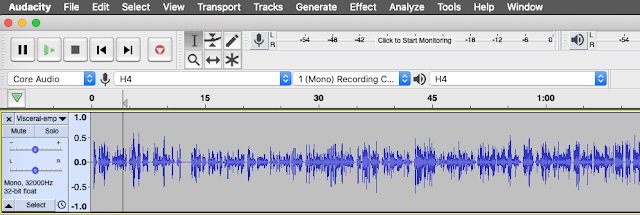


A screen shot of an Audacity project

The screenshot above illustrates what waveform levels might look like for your recording. Above all else  trust your ears to judge the quality of a recording when you listen back to it.

Editing Audio for Podcasting with Audacity

Save Save Save - the Project file and folder

Everything lives in .aup3.
You are strongly advised NOT to save your active project to an external USB stick/disk, networked storage or cloud storage as it is unlikely to be fast enough for satisfactory recording and editing.

To avoid data loss save the project frequently. Make a local disk copy for project editing as Audacity generates very large sets of project edit/state files (online cloud drive services may not unpack or stage quickly enough to support Audacity's project edit/save cycle).
To share an Audacity project with others you will need to share the project aup3 file. 
n.b. older versions of Audacity stored data in a project _data folder.  If you move to Audacity 3 there will no longer be a _data folder for each project (yay).

And save save save save frequently. 
And occasionally 'save' then 'close' the project window to force the project to compact safely. 
Reopen and continue working.

Importing audio

Create a new project and save to disk.
    File > Save Project > Save Project (cmd S)
Import previously recorded audio (an mp3 or wav file). 
    File > Import > Audio
Save
    cmd S 
Your Audacity project with at least one audio track will resemble the screen shot above.
You can play, pause and even record new audio to the current track. 
The playhead is the vertical line displayed over the waveform. All tracks will play through the audio device unless muted or one is soloed. The keyboard space bar toggles the play/pause function from the current playhead.
Once you start importing audio (particularly high quality poly WAV recordings), the Audacity project file (as of version 3 this will be the *.aup3 file) can become very large very quickly (anywhere from 3 GB to 36 GB). 
I'm not 100% sure how to keep project size manageable (up to 2 or 3 GB seems about right) but have been experimenting with setting the project quality preferences, changing the default sample format from 32-bit float to 16-bit. Audacity may still spend 10s of minutes compacting the project when you close or quit.


Quick select, cut and paste

The Audacity toolbars, click and drag to rearrange or float

Choose the Selection Tool (F1) to edit your audio track directly. Click-drag to highlight parts of the audio waveform. Use the cursor to select the waveform to copy (cmd C), paste (cmd V), duplicate (cmd D) cut (cmd X) or delete (del, backspace or cmd K) along the timeline. The edit commands are also accessed via the menu.
    Edit > etc.

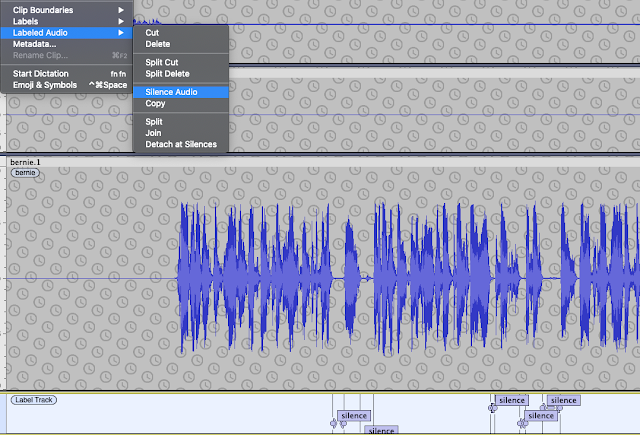
Automatically suppress background and soft sounds like breathing

Use Label Sounds to automatically search for and label silence (Audacity manual)


Select Silence and suppress e.g. Silence Audio or manually e.g. Select and Normalize -35dB


Using Tracks 

Import a second audio file (for example, our intro/outro music).
Save the project (you should save frequently).
You will see at least two tracks in the current Audacity window.
Toggle the Sync-Lock Tracks setting if you want multiple tracks to overlay each other. This is useful if for example you want to overlap and slowly fade out an intro jingle.
    Tracks > Sync-Lock Tracks (on/off)
You can organise the structure of a recording by using new tracks for sections of audio (to organise the large scale edit).
As of Audacity 3 you can now grab the track label bar when the hand icon/tool appears. This is a really handy :-) approach for aligning track segments or to move a split selection from one track to another.

Large scale edit

Your listeners want a well edited informative podcast so remember, less is more. You will have to listen (and re-listen) to your material and decide what to keep or delete. Think about the length and structure of the recording. You can change the order. You will delete stuff so do it. Concentrate on large chunks, the structure of the talk. Don’t worry about breathing, coughs and minor noises just yet. 

Auto-Duck workflow...
Use noise-reduction on a scratch-track then auto-duck then auto-duck inverse in sequence to selectively reduce breath noise, background noise and artefacts on your working track (a good explanation video at this link).
1. duplicate the audio track to a new scratch track and apply noise reduction several times to the scratch track only...
2. create a new control track ABOVE the scratch track and generate a tone in this track: Sine, 120 Hz, 0.2 amplitude.
3. Auto Duck is applied "top to bottom". Select the track to be "Ducked" with the track below it having the "Auto Duck" pattern. Then apply Effect > Auto Duck (or Effect > Volume and Compression > Auto Duck), using the settings illustrated below...


4. Do this again but applying the new settings illustrated below...
This workflow leaves you with a track that has background and selected sounds like breathing removed from the speech-gaps.

Small scale edit

After the large scale edit more or less done, spend time on the small scale edit. This involves zooming in and fine-grained cut and pasting. But think before acting, is it really necessary to remove every single intake of breath? 
For example: cut long gaps, background noises and any generally unnecessary audio. You might also cut some of the egregious 'emms and ahhs' and nervous filler speech we all use. A caution though, the small scale edit can become a journey without an end, or at least a very long journey.
Note: "Sometimes you will not want to close the gap and yet still remove the noise, for instance if somebody breathes loudly. For such occasions copy a section of audio during which nobody is speaking (e.g. at the start of the recording) and paste it over the unwanted noise. This will preserve the natural pacing of speech." (source: Cook & Holdis, CEU Podcast Library - link)

Fade-in Fade-out

Apply fade-in and fade-out when you want the speech to start or end smoothly.
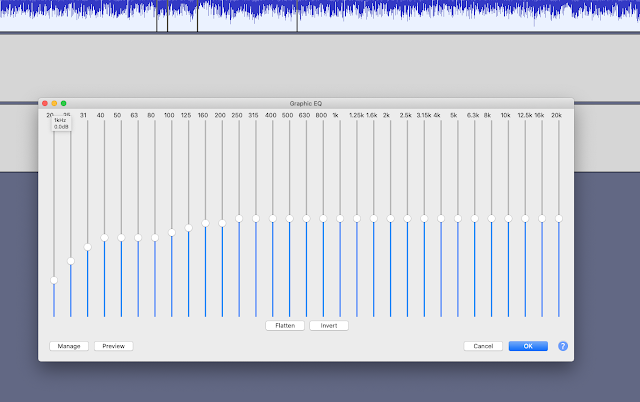

A useful Audacity EQ setting

Post-processing - Loudness Normalization 

Start out by applying loudness normalization (default -23 LUFS) separately to each track - why separately? Each track has its own average. I think normalising across all tracks at the same time biases the average gain to the loudest track's level. The same thing happens with Normalize but you can use that to your advantage to selectively boost or reduce selected loud or quiet segments.

Post-processing - noise reduction (if needed)

Select a several second sample of just the noise you want to remove.

Post-processing - low pass / high pass and other ways to reduce echo?

What to do if the original recording has transient audio peaks (annoying clicks, chirps, squeaks etc)?
Different approaches available depending on the original capture...
...via EQ
Apply the low pass filter at as low a cut-off level as you can get away with e.g. 1,100 Hz, 12 dB roll-off
Then apply click removal (200/40)
...via EQ again
Another alternative is to apply the RIAA filter using the Filter Curve EQ effect. This shifts the vocal emphasis towards the bass without over-muffling the sound. Reducing the intensity of the higher frequencies allows the listener to focus on the mid-low vocal range and deemphasises the intensity of any annoying high-end audio reflection that gets captured so easily when using a condensor mic in a room without sound treatment.


Then EQ->Normalize->Compressor->Normalize (can repeat if needed) as follows...

1. Post-processing - Graphic EQ (equalization)

Base boost plust treble boost

2. Post-processing - Normalize

Apply default (-3dB) - the waveform will push over 0.5 but keep away from 1.0

3. Post-processing - Compressor (last)

Select -19 dB or choose a threshold between default -12dB down to as low as -30dB 
Select noise floor, around -50dB
Select ratio 4.7:1 or vary, typical ratio, between 2:1 - 3:1 - 5:1
Drop attack time (0.2s) and release time (2.0s) to maximise compression applied

These settings end up boosting the volume (visually the waveform moves closer to 1.0) making it too loud and noisy so you'll need to normalize (or amplify) again...

4. Post-processing - Normalize (again)

Apply default (-3dB) or you can apply Amplify -3dB, for the same result. 
The desired result being for the waveform peaks to re-balance back to around the 0.5 level.

Installing the De-Esser and De-Clicker Nyquist Plugins...

Apply De-Esser and De-Clicker if needed

Improving a Zoom track?

Loudness Normalization > AUMatrixReverb > ClipFix > Normalize 3 > Amplify 3
Apply Noise Reduction if a suitable noise sample is available

Overall, peak levels to be no more than 3dB
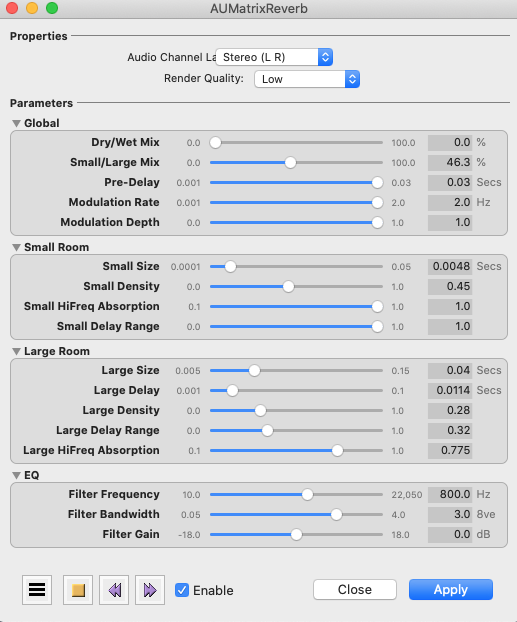
AUMatrixReverb settings may help to obscure small room reverb

Alternatively or in addition you might get some improvement by applying the AUBandpass Filter 
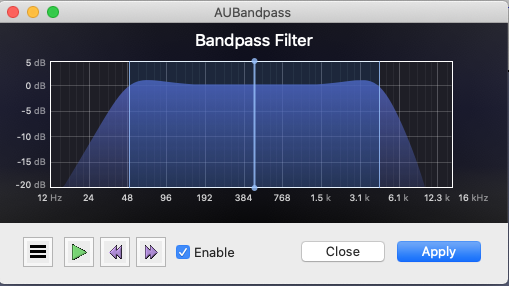
AUBandpass Filter


Finish up

Export the mp3

Finally, create the finished product, by exporting to an mp3 file. 
> File > Export > Export as MP3
This mixes all tracks in the Audacity project down to a single track. 
Use settings similar to the following to export your audio file.


Quality checks:

  • Is the intro/outro music at a suitable level?
  • Does the intro/outro transition smoothly to/from the spoken audio?
  • Is the spoken audio at a suitable level? (i.e. no clipping, waveform amplitude averages around 0.5 on linear scale)
  • Is the speed of speech natural?
  • Large scale edit - remove fumbled speech, removed confidential disclosures, cut out a duplicate or passages that were off topic, etc.
  • Small scale edit - remove ticks, emms, ahhs, sighs, distracting background, etc.
  • You wouldn't normally have backing music running throughout a podcast, but in some cases, for example, background room noises leaking into the audio, so you may decide to use low volume background as a filler/distractor.

Useful links

An Audacity tutorial on mixing a narration with background music
https://manual.audacityteam.org/man/tutorial_mixing_a_narration_with_background_music.html

Refer to the Audacity manual online (e.g. the track panel description/explanation is at manual.audacityteam.org)

An Audacity user's simple tutorial and workflow activities:

Using the Compressor in Audacity

Using Noise Removal in Audacity

On including music from other artists (for atmosphere, decoratively, for intros/outros & transitions)

In the first instance, if you know the artist ask for their permission to use their material. You may be pleasantly surprised by the positive cycle of recognition and community surrounding artist works. Make sure you acknowledge them in your show notes.

We recommend releasing under the “Attribution-NonCommercial-ShareAlike version 4.0  creative commons licence (aka CC BY-NC-SA 4.0). You can choose from a number or variations of the CC licence; CC BY, CC BY-NC, CC SA etc.
These licences can be viewed at https://creativecommons.org/licenses/by-nc-sa/4.0

Always check the royalty free claims of audio samples found online. If you want to find audio from online sources, search for CC BY titles on Soundcloud or on YouTube
The link to the YouTube channel  "Of Musicians" below is a collection of a selection of royalty free original music.

Record the following information in your show notes to establish the provenance and bona fides of 3rd party music, artwork and creative content that you decide to use:

Music (CC BY-NC-SA licence) 
Title: “a title”
Artist: “a name”
Source: “a link to the original”
Licence: “CC BY-NC-SA”

Cover Art (CC BY-NC-SA licence)
Title: “a title”
Artist: “a name”
Source: “a link to the original”
Licence: “CC BY-NC-SA”

Example workflows:

Note, don't just apply these without testing. The basic method is to select a 10s sample and preview effects/filters until you are happy with the sound.

Simple standard process
Align tracks
Per-track noise reduction
Isolate voices
De-clicker (default) on all tracks (process run-time is typically the full track duration e.g. 15-30+ minutes)
De-esser (default) on all tracks (process run-time is a small fraction of the track duration)
Loudness Normalization (-23dB LUFS)
Compressor (default)
Makeup soft and suppress clipping on small edits with Normalize.

For an original track that had a pronounced small 'room' sound and a tendency to 'clipping zone' raw i.e. the waveform looks high, square and flat.
Align and isolate
De-clicker (default) on all tracks (process run-time is typically the full track duration e.g. 15-30+ minutes)
De-esser (default) on all tracks (process run-time is a small fraction of the track duration)
Loudness Normalization (-23dB LUFS)
Compressor (default)
Loudness Normalization (-23dB LUFS) (again)
Makeup soft and suppress clipping on small edits with Normalize.
AUMultiBandCompressor on affected track (the Sub Control preset sounded nice)
Normalize all audio to push up/down to average 0.5 waveform view (to give a typical -12dB to -6dB range with -3dB peaks)

For a track with clicks and speech that sounds very wet.
De-clicker (non-default 2 pass or more) on wet track.

Isolating second voice when two mics in the same room
Switch to Spectrogram view and select vocal patches with "Spectral edit multi tool" to fade-edit cross-talk.
AUMultiBandCompressor on affected track (the Sub Control preset sounds nice)

For a track with small room reverb and 'tinny' mic
Switch to Spectrogram view and select low frequencies 1-300Hz with "Spectral edit multi tool" to fade-edit.
Apply Filter Curve EQ - apply 100Hz Rumble filter to remove 'rumble pressure' from the audio (it feels like pressing on your ears when listening with headphones).
Apply Filter Curve EQ - apply Radio filter to remove the sensation of light 'highs' pressure when listening to the audio.

Guest Interviews

About Design Talk

The podcast is called "Design Talk (dot IE)". It is hosted on acast, and has its own website www.designtalk.ie. (Search for "Design Talk (dot IE)" via your usual player).

The podcast is recorded live, not prerecorded. We are very keen on balanced contributions from all participants. The moderator / host's role is to invite everyone to talk, to move the conversation along and gently redirect it if needed. The engagement person's role is to monitor the chat and other channels, working with the moderator / host to encourage, respond, drawing attention to comments etc.

To make for lively panel discussion, everyone should have something to say about everything, to share and discuss ideas.

We use show-notes. The show-notes act as a guide rather than a tight script, the show itself always takes its own course. 

Avoid reading word-for-word scripted responses - unless you have amazing voice acting skills it is  impossible to not to sound wooden. However the activity of preparing questions and statements readies the mind and enables you to engage nimbly with the flow of a discussion.

The Podcast Deliverables/Activities:

  1. Preparing, using the show-notes template.
  2. Prompting and responding to the audience.
  3. Hosting/recording the guest interview.
  4. After recording - editing the audio file using Audacity. Add intro and outro. Edit out gaps and errors.
  5. After recording - update the show-notes using the template.
  6. After recording - provide individual cover art by adapting the provided template.
  7. After recording - utilise social announcements (see the show-notes template)

What goes into the show-notes?

Think of the show-notes as something like the sleeve notes that accompanied LP records.
The show-notes start out as a loose structure with reminders and prompts for the recording session.
But the show-notes are also used to capture and summarise all the relevant useful information in a concise format containing: 
  • The questions/observations that prompted your discussion with the guests
  • The people involved and their roles
  • The title/subtitle, episode #, season #, date of recording 
  • Kernel statements for the socials
  • Information about the music elements used if any for intro/outro, backing and transitions
  • Description and explanation for why you chose a particular artist and/or musical element, providing as much source information as possible but most importantly the correct licence and attribution
  • Licence information for the intellectual properties
Note: the podcast publisher has editorial control and has final say on the finished production.

Seek inspiration and review previous episodes to understand the extent of detail and level of quality that is expected.

Is there a role for visual aids during a podcast? If you or your guests feel that visual props and different kinds of activity fit with the scope of your session then yes, you can use props like graphics, websites, slides and engagement tools such as surveys and whiteboards for interactive components.

However: as the finished product will be an mp3 file (an audio podcast) we expect that the visuals are merely aides for the talk, rather than substitutes. Your show-notes can be used to share links to online versions of visual elements, references to other material etc. If you have an essential diagram or picture, then please provide a description and explanation for the audience who won't be watching the video version. Some of the visual segments of the (i.e those without spoken descriptions) will not make it into the finished edited podcast version. For the final edited podcast, assume your audience is only able to listen to the audio file.

Podcasting - tips

The podcast will be live, not prerecorded. There will only be one take. We are very keen on balanced contributions from all participants. The moderator / host's role is to invite everyone to talk, to move the conversation along and gently redirect it if needed. 

The podcast host act as chief questioner/host/producer/director/audio engineer, cook and bottle washer. 

The guests role is to read any needed material in advance and collaborate with each other to make for lively panel discussion. Everyone should have something to say about everything. The panel concept is for a discussion of ideas not a presentation of the papers. 

We provide a running order / show notes. The order of questions (and indicated responses) are merely a starting point. The show notes / running order is to be used as a guide rather than a tight script and the show itself should take its own course. The structure of the running order is intended to shape rather than control a panel discussion. 

Usually there will be no need for guests to read aloud word-for-word scripted responses. However it is a good thing for guests to prepare in advance by writing out ideas, prepare bullet points or mind maps. If discussing a publication have a copy to hand with your own highlights or underlines. Regardless of whether we have a chance to read a prepared speech or not, the activity of preparing readies the mind and enables us to engage nimbly with the flow of a discussion. 

The first class of AY 2020: Sep 22 MIS41020 in room E101


Tuesday, 3 August 2021

Product owners, managing the tension between control and flexibility

This open learning resource aims help you develop your own personal stance towards organising digital projects and managing the development process. There will always be a tension between what some perceive to be the rigorous approach to product management versus the flexible approach. The desire for control must be balanced against the need for flexibility.

There are various stances on product management, be it agile or project management or some other philosophy informs thinking. Working in the field you should reflection on the relative merits of various related industry attempts to 'scale and standardise' product management, in particular, systems for large teams doing distributed development, large scale deployment/operations.

  • The AgileAlliance's certification services (https://www.scrumalliance.org/)
  • The LeSS framework (Large-Scale Scrum https://less.works/)
  • The SAFe framework (Scaled Agile Framework https://www.scaledagileframework.com/)
  • The PRINCE2 framework (https://en.wikipedia.org/wiki/PRINCE2)
  • The ISO9001:2015 Quality Management (https://www.nsai.ie/certification/management-systems/iso-9001-quality-management/)
  • Oh, and of course, general project management.

Monday, 28 June 2021

Globalambition dot ie

Start in Ireland 

Start in Ireland is a new online repository of start-up supports in Ireland. The portal simplifies the process of finding relevant start-up information and provides a pathway for people who want to start or grow their early-stage businesses. 

https://globalambition.ie/startinireland/

Tuesday, 1 June 2021

What is in a one page research proposal?

Basic structure as follows:
TITLE (a couple of words, a phrase or a short sentence)
ABSTRACT (- around 300 words - a very short 'story' from which answers to the questions above can be inferred )
REFERENCES (3 TO 8)

Self-test that the research scenario is viable, you should be able to answer the following questions

  • Is the Title phrased as a question that research may inform the reader what you're doing? 
  • Research target(s)? (an App, computer program, a device, a service) 
  • Research subjects(s)? (self and close contacts only) 
  • Research scenario(s)? (attaining some kind of goal)
  • Have you identified at least one specific research method for this study?

After reading the proposal and talking about it we should be able to answer the following questions.
  • The focus of the investigation (a one sentence statement, often the title)
  • Motivation, why it is of interest (might be something puzzling at work or a question you have)
  • Possible data sources (speculation is ok)
  • Suggest the kind/types of data that will be gathered (speculation is ok)
  • Indicate your philosophical/theoretical stance, domain knowledge area, discipline (provide some references to theory)


Tuesday, 1 December 2020

Cloud, Power Apps and AI

Cloud, Power Apps and AI: a workshop with Stephen Howell - Academic Lead & Accessibility Evangelist, Microsoft Ireland

The session runs in two 1 hr blocks with a 1hr break between.
First session is 9-10am followed by 1hr break
Second session is 11-12am

Scope: A tour of the cloud pyramid and illustration of where MS places the various offerings from AI, processes, storage, mobile, through to accessibility and its amazing real-time language translation/transcription services. The objective aligned with the class's learning goals is to experience Microsoft's rapid prototyping tools; A practical introduction to prototyping with Power Apps and/or introduce other MS tools used for similar things.

First hour: The basics of the cloud and some AI demos (30 minutes) and then intro to PowerPlatform (Automation, Visualisation, Apps) (30 minutes). OneNote demo - challenging sentences - using Immersive Reader

Second hour: Hands on demo - the background to building a line of business app with power tools (50 minutes with 10 minutes for questions)
AI image detection

Especially with the introduction of networking, of internets software delivery and cloud services - all a user needs to ask the apps and applications he or she uses is "what utility can I get without having to know how it actually works?"

The cloud pyramid diagram

The cloud pyramid diagram captures the distinct technology-system layers of modern computing (IAAS, PAAS, SAAS, FAAS). 

On the origin of the term “cloud computing” is attributed to George Favaloro and Sean O’Sullivan from Compaq Computer in Houston, working in the Internet Business unit. https://www.technologyreview.com/2011/10/31/257406/who-coined-cloud-computing/


Session panel: Stephen and Allen

Monday, 23 November 2020

Exercise: Retrospective


Objective:
To understand the activities that occupied our time on the most recent project.

Preparation:
This exercise should be run at a milestone or conclusion for a development project. It can be carried out individually or in small groups.
Allocate at approximately 30” to run this exercise.

Material:
Provide one copy of Allan Kelly's dialogue sheet to each group.
Or use an online styled version (jamboard)
Retrospectives from the Learn/Design/Construct exercise:


Instruction:
Follow the steps on the dialogue sheet and produce an activity/timeline sketch for the project.
At the end of completing the exercise review the diagrams, group and display them during discussion. Alternatively select student/groups to show, talk about and explain their diagrams to the class.
Write your name(s) on the sheet.

Outputs:
A single page upon which each student/group creates their own activity/timeline sketch and learnings list. 

Learning Outcomes and Reflection:
Design as a learning process
Need for feedback
Attaining objectivity
Give voice

Practical Aim:
Identify the key characteristics of collaborative design projects.
Demonstrate a democratic review process


Tuesday, 10 November 2020

Exercise: Sutton's creative strategies

Results from 2020 Jamboard (link)


results from Nov 2019

results from BCFE 2019


results from Nov 2010

results from Nov 2011
Creating an 'organic' histogram of the results

Objective To assess how prepared I am to manage a creative team and a truly innovative project.
These questions are set out as either/or style. There is no middle ground, they are not 'fair'. They act as a forcing function to get you to honestly resort to your true belief on how you intend to manage creative work teams. Your answers are naturally founded on your own personal beliefs and/or experiences. Your answers will probably change if the test is taken at another point in your career.

Instruction stage 1
Ask everyone to self-access the following questions.

ScoreEitherOrScore
+1Seek out and be attentive to people who will evaluate and endorse the workSeek out ways to avoid, distract, and bore customers, critics, and anyone who just wants to talk about money-1
+1Think of some sound or practical things to do, and plan to do themThink of some ridiculous or impractical things to do, and plan to do them-1
+1Reward success; punish failure and inaction Reward failure and success; punish inaction-1
+1Bring happy people together and make sure they get alongBring happy people together and get them to fight-1
+1Promote “fast learners” (of the organizational code)Promote “slow learners” (of the organizational code)-1
+1Hire people who make you feel comfortable, whom you likeHire people who make you uncomfortable, even those you dislike-1
+1Hire people you (probably) do needHire people you (probably) don’t need-1
+1Take your past experiences and replicate themTake your past experiences and forget them-1
+1Use job interviews to screen candidates and, especially, to recruit new employeesUse job interviews to get new ideas, not to screen candidates-1
+1Do something that will probably succeed, then convince yourself and everyone else that success is certainDo something that will probably fail, then convince yourself and everyone else that success is certain-1
+1Ignore people who have never solved the exact problem you faceIgnore people who have solved the exact problem you face-1
+1Encourage people to pay attention to and obey their bosses and peersEncourage people to ignore and defy their bosses and peers-1
Calculate your total personal score. Possible value ranges between -12 through to +12.

Instruction stage 2
Provide Sutton's principles paraphrased below for creative teams and then open the discussion, e.g. consider some of the questions below.
  • Place bets on ideas without heeding projected ROI.
  • Radical innovation implies ignoring what worked before.
  • Take happy people and goad them into disagreement.
  • Reward action, success AND failure.
  • Have people who don’t fit in.
  • Disagreements are necessary.
  • Use new employees to bring in NEW ideas.
  • Generate and use NEW ideas.
Nilofer Merchant (link) illustrates the contradictory qualities of situations where groups attempt creative problem solving through collaboration. In asking why (creative) collaboration is so rare she hits on a realisation, it is dangerous, risky, involves loss of face, basically it is something that can't be controlled and that translates into something to fear.

Discussion
  • Are the recommendations irresponsible?
  • Is a creative culture doomed to self-destruction?
  • Can a creative development culture coexist with general production?
  • Are Sutton's principles simply those that apply in startups?
  • If this is startup thinking or behaviour where does it fit in 'scale organisations'?
  • Must innovation efforts be separated from the mainstream organisation?
  • Does the "Innovator's Dilemma" imply that innovation efforts need independence to succeed?
  • Thinking of the possibility of 'Zones' of creative production occurring within the traditional monolithic organisation; Characterise a creative zone or project in such a way that it can be understood, appreciated and supported by a wider conventional organisation: skunk works, black team, blue sky, laboratory...

Observation: This test reveals how 'prepared' for and 'aware of' we are, of the intrinsic demands of creative innovative design environments. In spite of rhetoric to the contrary most organisations and most employees are not involved in innovation. In the main we repeat and reproduce routines that extract value from existing products, markets, customers, business models. Consequently most of us adhere to ingrained approaches to valuing, managing and acting within teams and their wider organisations.

Consider Ken Schwaber's commentary on the relationship between Agile and the PMI...
"We have found that the role of the project manager is counterproductive in complex, creative work. The project manager’s thinking, as represented by the project plan, constrains the creativity and intelligence of everyone else on the project to that of the plan, rather than engaging everyone’s intelligence to best solve the problems." (link)

References
Cliff Kuang. The 'done' manifesto: 13 Rules For Realizing Your Creative Vision. 2011 (link)
Nilofer Merchant's post the "Eight Dangers of Collaboration" (link)
SUTTON, R. I. 2001. The Weird Rules of Creativity. Harvard Business Review, 79, 10.
SUTTON, R. I. 2001. Weird Ideas That Work: 11 1/2 Practices for Promoting, Managing, and Sustaining Innovation, Free Press.


results from FTa 2015

results from FTb 2015

results from PT 2015

results from PT class 2013


results from FT class 2013


results from class 2012

Tuesday, 3 November 2020

Pixar (case)

Compulsory Reading: Catmull, E. 2008. How Pixar Fosters Collective Creativity. Harvard Business Review, 89, 9.

Listen to Ed Catmull's interview with Paul Michelman on HBR IdeaCast / Episode 109 

How Does Pixar Foster Collective Creativity?
One industry compares well with that of software development; film. Both produce information goods, digital or digitisable products (Shapiro and Varian, 1998). Both rely on the highly creative work of their designers. Both are produced by teams and teams of teams. The industries themselves have become intimately interdependent as film studios’ demand for visual effects, modelling, simulation, special effects, post processing etc has driven rapid innovation in graphics and animation software.
John Lasseter at the 2009 Venice Film Festival (src: wikipedia).
Software studios create the tools and techniques to produce effects that are used increasingly in films. Films using more realistic and convincing effects constantly push the boundaries of what is possible, and this in turn drives further technology development. The cross-over between software and entertainment is even ingrained into the culture of film, computing and programming. Computing and computer games have also been used as subject matter and characters, not just as tools, from the earliest days of film. We can even argue that visions of 'computing in film' precedes its realisation in reality e.g. Fritz Lang's Metropolis (1927).


Pixar's Cultural Roots
Pixar grew out of Lucasfilm's CGI division which was formed by George Lucas to create the special effects for the first Star Wars trilogy. Lucasfilm's Graphics Group eventually became ILM (Industrial Light and Magic) and ILM in turn nurtured the early Pixar. In the days of Lucasfilm and ILM George Lucas encouraged wider intellectual engagement with academics and industry; the same culture was present in Pixar.
“...a film company that was pushing the boundaries. George didn’t try to lock up the technology for himself and allowed us to continue to publish… This made it possible to attract some of the best people in the industry…” (Catmull, 2008)
From its beginning Pixar considered engagement with others as an expression of their core belief in community and ‘relationships that matter.’

The Creative Crisis: With the Toy Story 2 project Pixar entered a crisis situation when they tried to release two high value projects in tandem; developing and producing A Bug’s Life in parallel with Toy Story 2, which was initially contracted to Disney as a 'release to video' offering. Pixar's ‘proven creative leaders’ had already moved on to the next project, "A Bug’s Life", while a second talented and capable team was working on Toy Story 2. However Pixar found that the second production team was not achieving the high production values, general quality and excellence that was the hallmark of Pixar movies. Pixar's "brain trust" eventually realised the Toy Story 2 team were failing on several levels.
“we had a good initial idea for a story, but the reels were not where they ought to have been by the time we started animation, and they were not improving. Making matters worse, the directors and producers were not pulling together to rise to the challenge.”
(Catmull, 2008)
Different reasons were posited to explain how the situation arose. Perhaps the lower quality production values of a direct to video project were a corrosive influence on Pixar’s values? Was the Toy Story 2 team demoralized by knowing that something less than acceptable was now acceptable? Was Pixar’s culture of excellence and in particular its image of ‘talent’ being corroded by Disney's definition of ‘acceptable quality’?

Toy Story 2 was now looking like it needed to be treated like crunch project with the all of the crazy demands of recovering a contracted production schedule that needed 18 months but only had 8. The problem was not in the high concept, but in the details, the coherence and logic of the narrative. Resolving the situation could have wide ranging impacts; much of the work they had thought was finished would have to be revised. Fixing it could impact character development, the storyline, CGI models, artwork, scenery, narrative, dialogue, soundtrack, EVERYTHING! Wouldn't it be easier to just ship a mediocre product? After all, excellence isn't everything?

References and additional sources (thanks to class members for links).
Catmull, E. 2008. How Pixar Fosters Collective Creativity. Harvard Business Review, 89, 9.
Lang, F. 1927. Metropolis (link)
Panzarino, M. 2012. How Pixar's TS2 was lost and then found (link)
Stopera, M. 2011. 33 things you probably didn't know about the Toy Story trilogy (link)
Nusair, D. 2011. More things you didn't know about the Toy Story Trilogy (link)
See the introductory section on Wikipedia (http://en.wikipedia.org/wiki/Toy_Story_2) n.b. Most of the content on Wikipedia is from the 2008 book The Pixar Touch by David Price.

Sunday, 18 October 2020

Previous research topic-titles

Previous research topic-titles listed below:
  • Mobile banking: the study of AIB mobile bank application.
  • Brain-computer interface for medical: evaluating the usability of brain chip for disabled person.
  • Gillette's marketing campaign: a sentiment analysis on Twitter.
  • Assessing the usability of taxi application Free Now.
  • How does ClubMed resorts design daily events.
  • A study into the growing influence of the internet of things in the modern household.
  • Assessing the usability of 12306 ticket purchase system.
  • Google Lens: evaluating the usability of AI & AR powered mobile application in today's world.
  • Digital-only banking: evaluation of Alat Nigeria's first fully digital bank.
  • Digital learning/e-learning: evaluating the usability of an e-learning model (Byju's)
  • Google Fit: encouraging you to exercise more.
  • Replacing B2B sales contacts with a website: an exploration of human-centered design methods for a loyalty solutions startup in HORECA industry.
  • Social Listening for Innocent Ireland.
  • A Study and Initial Report on a Requirements Elicitation Process for an Encrypted National Telehealth Conferencing Platform
  • Ripple for cross-border payments: evaluating Ripplenet as a payment solution for banks and financial institutions.
  • Too good to go - a technology-based approach to food waste management.
  • Research on the usability of mobile short video TikTock.
  • Utility of interviews, surveys and prototyping within the context of improving user experience of smart travel card mobile applications.
  • HDFC EVA: can a chatbot replace customer service agents?
  • Gamification of eco-apps: assessing the implementation of gamified elements to improve user engagement of the application Litterati.
  • Evaluation of Historical Analysis in context of Atlassian’s product strategy and Survey to analyse users’ attitude on Jira.
  • Paytm an e-wallet: assessing the usability of mobile based e-wallet application.
  • Usability in context: a case for the Joulebug app in motivating local environmental stewardship
  • Usability analysis: Paytm digital wallet - one step closer to a cashless economy.
  • Adaptability of Google Pay in India and Ireland.
  • Innocent Smoothies Ireland case study: Twitter campaign impact * strategies comparison
  • Revolut for banking: assessing the usability of the app as a new electronic money institution.
  • Brightspace: an investigation into improving participation and engagement with the learning management system discussion board.
  • Analysis of Uber's disruption to the traditional taxi-service industry
  • Evaluation of Textual and Sentimental analysis methods in the context of social medial campaign Gillette 2019 ‘Men Can Be Better’ on YouTube.
  • Re-designing a more social spotify UX in mobile.
  • Usability Assessment of Oneview Patient Engagement Application Based on Empirical Evidences
  • Growth of the online food industry: comparative analysis of the two online food industries Swiggy and Zomata in India.
  • How do Results of Unmoderated and Moderated Think-Aloud Protocols Differ in Usability Evaluations?
  • Swipe Left on Ghosting: A Usability Analysis of Tinder’s Chat Function
  • Conversational AI and Smart Speakers: Usability & Requirements Study
  • A Diary Study in the Context of Smart Furniture for Remote Workers
  • Innovation Reading in the Digital Age: Usability, Requirement Analysis, and Feasibility Study of Blinkist
  • Redesigning Notification Badges on iOS 12 and its impact on user’s task engagement
  • Evaluating the Usability of the Collaborative features on LMS Blackboard Learn
  • Improving User Experience of IRCTC Rail Connect App by Incorporating Human Computer Interaction Guidelines
  • Contactless Payment in Germany
  • User Privacy on Apple iCloud Photo Library
  • Usability Analysis of the GoCar iOS Application
  • Empathy Tools Critique
  • Empirical Study on the Build-In Anti-Theft Measures of High-end Android Smartphones
  • What are Technological Tools That Facilitate Mentorship and Employment of Persons with Disabilities? A Case Study on Nextbillion
  • Understanding, applying and evaluating the use of eye gaze tracking software: lessons learned evaluating company career websites
  • Improving Ctrip Mobile App as a user-friendly one-stop-shop
  • The Prevention of Falsified Medicines in Ireland – An Analysis of The Irish Medicine Verification System (IMVS)
  • VR for Learning: Assessing the Usability of Mobile Based VR Headsets in Classrooms
  • An Enquiry Into Motortrans.ie
  • How effective are the gamification features in the Apple Watch in promoting physical exercise? A diary study.
  • What Type of Data is more Suitable for Assessing and Improving the Usability of a Chat-Bot?
  • SDL Trados and OmegaT – A Comparative Analysis of Usability of the Main Features
  • Comparing the Technology Behind Nest Learning Thermostat to That of a Conventional Thermostat Along With Their Energy and Cost Efficiency
  • How Can Netflix’s Search Feature be Improved for Users?
  • Managing Organizational and Process Innovation – Lessons Learned From a German Non-tech SME
  • Usability Analysis of Flightradar24 Mobile Flight Tracking App
  • Shop Code: Usability Testing and Redesign Proposal
  • How Drones Can Leave The Hazardous Zone
  • Usability Study and Redesign Proposal for the Google Play Store app
  • Using the Trinity ID as a starting point, how can iDly update that system in order to enhance the features of their digital ID cards?
  • How to improve the Dash students’ experience?
  • Housemydog.com: how to enhance the design and development features of a dog minding platform through a usability and feasibility study
  • BRS Golf Booking System
  • Plynk - the money messenger
  • Can sleep apps improve your sleep troubles?
  • Improving Hailo
  • Aer Lingus iOS app usability study
  • Usability analysis on IPF app for Patient M Power
  • How can the “dublinbikes” mobile application better reflect and channel the innovative nature of bike sharing 
  • The Dublin Bus Mobile Application: usability analysis
  • GiapSchool usability study and improvement
  • UCD Mobile: Usability & Requirements Study and Development proposal
  • Roomys Evaluation and Improvement Project
  • Effy solutions usability study and design proposal
  • Metrifit usability, requirements analysis and feasibility study to update extant system.
  • External Brain: Experiencing Evernote
  • Design and development proposal for ChildDiary v2.0
  • Buymie v1.2.0 – Usability Study
  • “Pay and Display” Is displaying necessary?
  • Cocoon: Lessons Learned From Evaluating a Software Startup.
  • A proposal for an Enterprise Resource Planning (ERP) system upgrade
  • (Kammavari Sangha Institute of Technology) KSIT website debunked
  • Redesign and Recreate a System for an Agency of Home Appliances Maintenance and Repair Services
  • Improving Trancehub
  • Selling, Point of Sale and Shop Systems for JD Sports
  • Smart Baggage Claim for RFID Enabled Airports
  • Coapp - collaboration tool for web designers
  • A Website Redesign of Ard Scoil Ris
  • Upgrading of Irish Light Rail ‘Luas Tram’ Ticketing and Fare Collection Machine
  • ‘Echo - The Premier Communication Application’
  • In-Car Voice Interaction System Redesign Proposal
  • Product for Bass Guitar to Midi Converter
  • Website Redesign Proposal for U.C.D Applied Language Centre
  • Redesigning Dublin’s Traffic Control System
  • Redesign of an Existing System Cineworld Ticket ATMs
  • Daft.ie Using Technology to Restructure Services
  • Tesco Mobile App: Connecting Recipes and Shopping function
  • UX/ID for Irish Multiplex Cinemas
  • To Improve the User Interface of the Blackboard Learn System
  • A Redesign Proposal for the Coillteoutdoors.ie Website
  • UPC Horizon UX Issues
  • CRM for an Online Insurance Broker - A Case Study
  • Stamp App - The Future of Postage Stamps
  • Redesign Proposal of PAYE Anytime
  • Android application for shopping and payment purposes with the use of NFC technology
  • HR System Functionality and Leave Management
  • Online Banking: A study of two Irish Bank’s and Possible Improvements
  • Leap Card New payment system proposal
  • Improving RTE Player
  • An Analysis and re-design of the current E-xamit website
  • Tool Repair System
  • UCARD System Development
  • Self-Service Library Machine: 3M ‘R-Series Model ‘8600’
  • Improving Tesco Self-Service Checkout
  • Bank of Beijing Personal Internet Banking System
  • SiSWeb – Redesign Proposal
  • Enhancing the Reporting Capabilities of a Banking Organisation
  • I-Concentrate - Control access to Apps, Networks, and Websites
  • A Redesign of the Current ATM System in Ireland
  • Improving user Experience on CopiPrint Machines
  • Introducing Mobile Payment to Irish Transportation
  • Bus Éireann Website and Tech Services
  • An Analysis and Redesign of Ticketmaster Event Ticketing Service Provider
  • Proposed Redesign of the Mantis Issue Tracking System
  • A Redesign of the Twitter Newsfeed
  • Analysis of current Intranet Facilities and Proposed Redesign
  • Re-design of the Ulysses self-service Help Desk module used by St. John of God Hospitaller Ministries
  • Redesign of Ryanair Website
  • Ad Server
  • LEAP Integrated Ticketing System
  • Ryanair.com- How can we do better?
  • Report on Sony Entertainment Network’s Online Store And Proposed Recommendations
  • Application Virtualization: An Aid for OS Migration (Windows)
  • Gamification of McDonalds App
  • Dublin.ie Redesign Proposal
  • Trolly Folly: An Analysis of the Ryanair Online Shopping Experience
  • The Introduction of a paid car parking solution to the UCD Campus locations of Belfield and Blackrock
  • Improving the M50 Eflow toll system
  • Payzone Parking Tag
  • Protecting ATM Users from Fraud


Wednesday, 7 October 2020

The talking about design - book club

- Talking about design, development, creativity -

Welcome to the Design Development Creativity Book Club. 

In this series we will be reading and reviewing Tracy Kidder’s award winning non-fiction account of a high-tech project. The Soul of a New Machine won the Pulitzer Prize for General Non-Fiction, in 1982.

We will be looking at the book from a number of viewpoints: General aspects of high-tech production; Innovation, management and leadership; Engineering culture and work practices; Teams and interaction.

The book offers a rare inside account of high-tech projects and provides a mirror in which we can contrast our own projects. What does TSOANM tell us about working in high-tech today? What has changed over the intervening years? What seems to have stayed the same?

Thursday, 24 September 2020

Jobs to be done - theory and perspectives from industry

The link below provides notes and a recap of a live streamed conversation between Jim Kalbach, author of the recently published The Jobs to Be Done Playbook, and a pioneer of a theory of "jobs to be done", Tony Ulwick.

The Jobs to be done approach requires designers to direct their full attention to the job a customer is trying to get done, and employs this knowledge for redesign, tweaking, injecting innovative products and services into the customer's chain of activity, the chain of "in order to", that they perform to satisfy a goal.

 https://www.mural.co/blog/jobs-to-be-done-livestream-recap

Tuesday, 22 September 2020

Research search and discovery - UCD Library

 A little detective work is sometimes involved in gaining access to research articles but it is well worth establishing the skills and ability to track down research publications and the like.

The first port of call should always be the UCD Library. We should highlight that the results returned by our library systems may differ depending on whether you have logged in to your UCD Connect account or not. This is because the library disseminates licensed content protected by copyright and thus cannot act as a back-door source to free access to 'for fee' publications. A web search via a search engine often links directly to the publisher however access may still be provided by the UCD Library negotiated access licenses with publishers. Publications may also be accessible via the University or state research organisations with accounts on third party aggregator publishers (like ScienceDirect) and other licensors of content. The UCD Library curates and manages access to all of these services on behalf of UCD's students, researchers and staff.

Exercise: 
 
1. Select the "One Search" widget and enter the title you are looking for.
An approach to effective use of One Search is to first search for the title of an article, then perhaps narrow the search criteria by gradually adding the author's surname, forname, year, etc.

2. Use a web search engine. The Google Scholar service can sometimes be particularly effective.

Examples for this week's readings...
A search for "Expressing Experiences in Design" on One Search yields

A search for "Expressing Experiences in Design" on Google Scholar yields

Similar results provided using the same approach for "Usability Evaluation Considered Harmful Some of the Time"

The UCD Library supports a wide range of tools for research discovery.

Thursday, 23 April 2020

Designing surveys and questionnaires is hard but we have good tools...

Designing surveys and questionnaires is hard but we have good tools... The UCD College of Business has a site licence for the online research survey package, Qualtrics. The licence is for both staff and students (use your @ucdconnect.ie email address as username to register).  Qualtrics is a leading online resource which enables users to engage in many kinds of online data collection and analysis.
Why do we recommend Qualtrics over other tools? Because it offers fantastic in-app advice and tips on good questionnaire construction.
  • We have unlimited users access for ALL staff and students across the College of Business for own projects and assignments.
More information at

https://iltg.ucd.ie/kb/qualtrics-surveys/